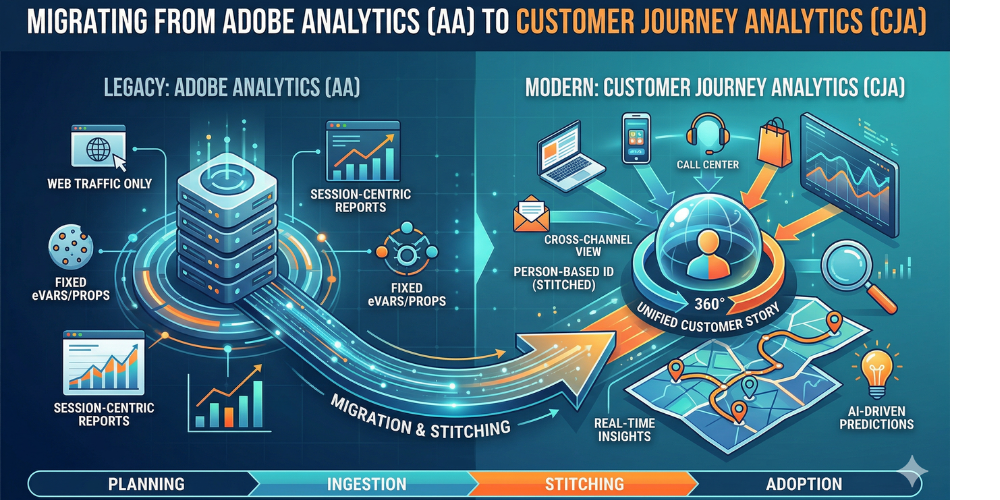
Moving from Adobe Analytics to Customer Journey Analytics isn’t just a version upgrade—it’s a fundamental shift from "web tracking" to "cross-channel intelligence."
Moving from Adobe Analytics (AA) to Customer Journey Analytics (CJA) isn’t just a version upgrade—it’s a fundamental shift from "web tracking" to "cross-channel intelligence."
While AA has been the gold standard for digital behavior, CJA breaks down the silos, allowing you to stitch together web, app, call center, and CRM data into a single, cohesive story.
If you’re planning this transition, here is a comprehensive guide to help you navigate the migration without losing your mind (or your data).
1. Why the Move? The AA vs. CJA Paradigm Shift
The biggest hurdle isn’t the technology; it’s the mindset. In Adobe Analytics, you work with eVars, props, and events tied to a cookie. In CJA, you work with XDM (Experience Data Model) schemas tied to a Person ID.
Key Differences at a Glance
| Feature | Adobe Analytics (AA) | Customer Journey Analytics (CJA) |
|---|---|---|
| Data Scope | Primarily Web & Mobile App | Any data source (CRM, POS, Offline) |
| Processing | At collection (Permanent) | At report-time (Flexible/Retroactive) |
| Identity | Cookie-based (MCID/ECID) | Person-based (Stitched IDs) |
| Variables | Limited eVars/Props | Unlimited Schema Fields |
| Historical Data | Hard to change once processed | Can be re-processed & modified via Data Views |
2. The Migration Roadmap: Step-by-Step
Don't try to "flip a switch." A successful migration follows a phased approach to ensure data parity.
Phase A: The Foundation (Data Ingestion)
Before CJA can show you anything, it needs data from the Adobe Experience Platform (AEP).
- The Analytics Source Connector: This is the "easy button." It streams your existing AA data into AEP datasets.
- Web SDK Implementation: To truly future-proof, start moving your tags from the legacy AppMeasurement.js to the Adobe Experience Platform Web SDK. This sends data directly to AEP in the required XDM format.
Phase B: Identity & Connections
- Define the Person ID: Choose a common identifier (like a hashed email or CRM ID) to stitch journeys across devices.
- Create Connections: In CJA, a "Connection" is where you select which AEP datasets (Web, CRM, Call Center) you want to include in your analysis.
Phase C: Data Views (The New "Virtual Report Suite")
Data Views are where the magic happens. Unlike AA, where settings are permanent, Data Views allow you to:
- Rename variables on the fly.
- Change attribution models retroactively.
- Set session timeout logic (e.g., a 30-minute window for web, but 24 hours for a retail journey).
3. The "Gotchas": Potential Pitfalls to Avoid
Migration is rarely a perfectly straight line. Watch out for these common hurdles:
- Metric Parity: Because CJA calculates sessions differently (based on timestamps rather than hit-processing), your session counts may not match AA exactly. Expect a 1–5% variance.
- Component Migration: You can use the Component Migration Tool to move projects, segments, and calculated metrics. However, some AA-specific features (like "Contribution Analysis" or "A4T" panels) may require manual rebuilding.
- Training Your Team: Your power users will look for eVars. You’ll need to teach them that "eVar1" is now "Page Name" or "Product ID" within the schema.
4. Best Practices for a Smooth Transition
- Run in Parallel: Do not sunset Adobe Analytics immediately. Run both platforms side-by-side for at least one full quarter to validate data and build trust with stakeholders.
- Audit Your SDR: Use this move as an excuse to clean up your Solution Design Reference. If you have 50 unused eVars, don't migrate them. Keep your schema lean.
- Prioritize Use Cases: Don't try to move every dashboard at once. Start with a high-value use case, like "Attributing Call Center volume to Web behavior," to prove the value of CJA early.
5. The Technical Deep-Dive: Understanding XDM
If Adobe Analytics was built on a "flat" structure, CJA is built on a "relational" one. To succeed, your team must master the Experience Data Model (XDM).
In the old world, you sent a string to an eVar. In the CJA world, everything follows a schema:
- Experience Events: These are time-series actions (clicks, views, purchases).
- Profile Records: These are attributes about the person (loyalty tier, home zip code).
- Lookup Tables: These are descriptive metadata (product catalogs, store locations).
Why this matters:
In CJA, you can upload a CSV of your product costs today, and it will retroactively apply to your sales data from last month. This "lookup" capability was a major pain point in legacy AA.
6. Real-World Use Case: The "Omnichannel" Journey
To help your stakeholders understand the investment, illustrate a scenario that Adobe Analytics simply couldn't handle.
The "Abandoned Cart to Call Center" Workflow
- Step 1 (Web): A customer logs in and adds a high-value item to their cart but doesn't check out.
- Step 2 (Email): An automated "abandoned cart" email is sent via Adobe Journey Optimizer.
- Step 3 (Offline): The customer calls the support line because the promo code isn't working.
Because you’ve stitched the CRM ID across the web, email, and call center datasets, you can now see that the call was caused by the web friction.
The Result: You can calculate the True Cost of Acquisition by factoring in the human labor of the call center—something traditional web analytics would never see.
7. A Checklist for Your "Internal Launch"
Before you hand the keys over to your marketing and product teams, ensure you’ve checked these boxes:
Compare a 7-day window in AA vs. CJA. Document the variance in "Orders," "Units," and "Revenue." If it's over 5%, investigate your timestamp settings.
Don't use eVar12 in CJA. Use "Internal Search Term." Use human-friendly names in your Data Views so that non-technical users don't need a "cheat sheet" to build a report.
CJA allows you to create Derived Fields—essentially complex logic (If/Then statements) that transform data after it’s been collected. Use these to fix tracking errors without needing a developer to change code on the website.
CJA is powerful—it can see PII (Personally Identifiable Information) if you aren't careful. Set up your Product Profiles in the Adobe Admin Console to restrict who can see sensitive fields like email addresses or phone numbers.
8. Looking Ahead: AI and Predictive Analytics
The move to CJA isn't just about better tables and charts; it’s about feeding the machine. Because CJA data sits on the Adobe Experience Platform (AEP), it is "AI-ready."
- Intelligent Nuggets: CJA uses Data Science Workspace to surface anomalies automatically.
- Attribution AI: Move beyond "Last Touch." Use algorithmic attribution to see which touchpoints across all channels—not just digital—actually drive conversions.
The transition from AA to CJA is a move from measurement to orchestration. It’s the difference between knowing what happened and understanding why it happened across the entire customer lifecycle.
The migration from AA to CJA is the path toward becoming a truly customer-centric organization. You’re moving away from looking at "sessions" and starting to look at "people." It’s a complex journey, but the reward is a 360-degree view of your customer that was previously impossible.
Validated by MarTechRise Labs