Third-party cookies are crumbling, browser privacy protections are tightening. Enter Adobe Experience Platform (AEP) Event Forwarding.
In the rapidly evolving world of digital marketing, the ground is shifting beneath our feet. Third-party cookies are crumbling, browser privacy protections (like Apple’s ITP) are tightening, and site speed has become a critical factor for both SEO and user retention.
For years, the industry relied on "client-side" tracking—stuffing our websites with dozens of JavaScript tags that fired directly from the user's browser. But that era is ending.
Enter Adobe Experience Platform (AEP) Event Forwarding. This isn't just a new feature; it’s a paradigm shift in how we handle data.
What is Event Forwarding?
At its core, Event Forwarding is Server-Side Tag Management.
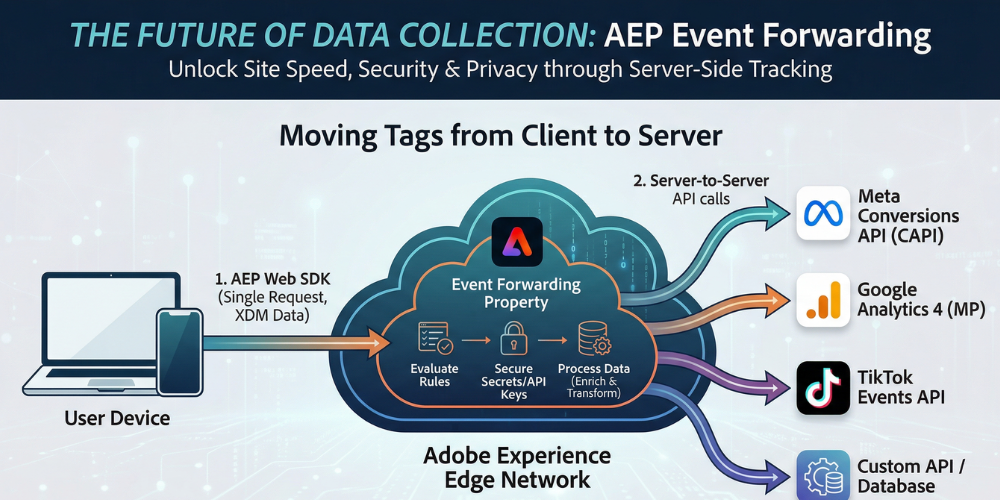
In a traditional setup, if you want to send data to Facebook, Google, and Adobe, the user's browser has to make three separate requests. With Event Forwarding, the browser sends one single request to the Adobe Experience Edge Network. From there, Adobe’s servers take over, "forwarding" that data to your various partners.
The Workflow: One Request to Rule Them All
- The Event: A user clicks "Purchase" on your site.
- The Edge: The AEP Web SDK sends a single XDM-formatted payload to the nearest Adobe Edge server.
- The Forwarding: Inside the Adobe cloud, your Event Forwarding rules intercept that data, transform it, and push it via API to endpoints like the Meta Conversions API (CAPI) or Google Analytics.
How It Works: From Edge to End-Destination
Event Forwarding isn't a standalone tool; it is an extension of the Adobe Experience Platform Web SDK (Alloy.js) and the Adobe Experience Edge.
- The Collection: A single request is sent from the user's browser to the Adobe Experience Edge Network. This "XDM" (Experience Data Model) payload contains all the necessary behavioral data.
- The Evaluation: Once the data hits the Edge Network, Adobe determines if that data should be sent to AEP, Adobe Analytics, or Target.
- The Forwarding: If Event Forwarding is configured, the Edge Network passes that data to a server-side "Property." Here, you can transform the data, map it to vendor-specific formats, and send it to non-Adobe endpoints (like a Facebook Conversions API or a Google Analytics 4 MP endpoint).
Key Benefits of Event Forwarding
Why go through the effort of moving your tracking server-side?
- Improved Site Performance: Instead of loading 10 different heavy JavaScript libraries (Facebook Pixel, TikTok Pixel, etc.), you load one (AEP Web SDK). This significantly reduces "Total Blocking Time" and improves SEO scores.
- Enhanced Data Security: You no longer expose sensitive API keys or PII (Personally Identifiable Information) in the browser's source code. All transformations and secret handshakes happen on Adobe’s secure servers.
- Bypassing Ad-Blockers: Because the data is sent to a first-party domain (using a CNAME) and then forwarded server-to-server, it is much harder for browser-based blockers to intercept.
- Data Enrichment: You can use "Cloud Data Sources" to fetch information from an external API or database during the server-side process and append it to the event before it hits the final destination.
The Anatomy of an Event Forwarding Property
Inside the Data Collection UI, an Event Forwarding property looks similar to a standard Tag property, but it functions differently:
| Component | Function in Event Forwarding |
|---|---|
| Data Elements | Used to extract specific values from the incoming XDM payload or to perform server-side logic (like hashing an email). |
| Rules | Triggered by an "Event" (usually the arrival of data from the Edge). These contain the logic for when to send data. |
| Actions | The actual delivery mechanism. This is where you configure the API call to the end vendor. |
| Extensions | Pre-built modules for specific vendors (e.g., the Meta Conversions API extension or the OAuth2 extension). |
Implementation Workflow
To get started with server-side tracking via AEP, follow these high-level steps:
- Implement Web SDK: You must be using the AEP Web SDK on your site to send data to the Edge Network.
- Configure Datastreams: In the Datastream configuration, toggle on "Event Forwarding" and select the appropriate environment.
- Build the Logic: Create Data Elements to grab the data you need (e.g., arc.event.xdm.commerce.order.price).
- Set Up Secrets: Use the "Secrets" feature to securely store your API tokens for platforms like Facebook or Google.
- Deploy: Just like standard tags, you must add your changes to a library and build it to the development, staging, or production environment.
Real-World Use Case: The Meta Conversions API
Many brands are struggling with declining signal quality on Facebook due to iOS privacy changes. By using AEP Event Forwarding, you can implement the Meta Conversions API (CAPI).
Instead of relying on a browser pixel that might be blocked, your server sends the purchase event directly to Meta. This ensures your ad spend is optimized based on actual sales, not just the sales the browser allowed you to see.
A Comparison: Client-Side vs. Event Forwarding
| Feature | Client-Side (Legacy) | Event Forwarding (Modern) |
|---|---|---|
| Data Control | High risk of data leakage. | Full control over every byte sent. |
| Site Speed | Each tag adds to the "DomContentLoaded" time. | Zero impact on the user's browser CPU. |
| Maintenance | Constant updates to vendor libraries. | Single SDK update; logic managed in the cloud. |
| Regulation Compliance | Harder to "stop" data once the script loads. | Easy to filter PII before it leaves your "walled garden." |
Is Event Forwarding Right for You?
While Event Forwarding is powerful, it does require a move to the Adobe Experience Platform Web SDK (Alloy.js). If you are still using the legacy AppMeasurement.js or the old Google Universal Analytics, now is the time to modernize.
Server-side tracking is no longer a "nice-to-have." As browsers become more restrictive, Event Forwarding provides the control and reliability needed to maintain accurate marketing attribution while respecting user privacy. It’s a cleaner, faster, and more secure way to handle the modern data ecosystem.
The Strategic Conclusion
AEP Event Forwarding is not just a technical upgrade; it is a compliance strategy. As global privacy laws evolve, the ability to centralize your data outflow into a single, controlled point of contact is invaluable. You are no longer just "tracking users"; you are "orchestrating experiences" with a focus on speed, security, and precision.
Is your data layer ready for the server-side revolution? The transition requires a shift in mindset—from front-end "tagging" to back-end "data engineering"—but the rewards in site performance and data integrity are worth the investment.
Validated by MarTechRise Labs