The digital marketing landscape is shifting beneath our feet. If your data feels incomplete or your website performance is sluggish, it’s time to talk about Google Tag Manager (GTM) Server-Side Tracking.
The digital marketing landscape is shifting beneath our feet. Between the "death" of third-party cookies, the rise of ad blockers, and the increasing demand for data privacy (GDPR, CCPA), traditional client-side tracking is hitting a wall.
If your data feels incomplete or your website performance is sluggish, it’s time to talk about Google Tag Manager (GTM) Server-Side Tracking.
What is Server-Side Tracking?
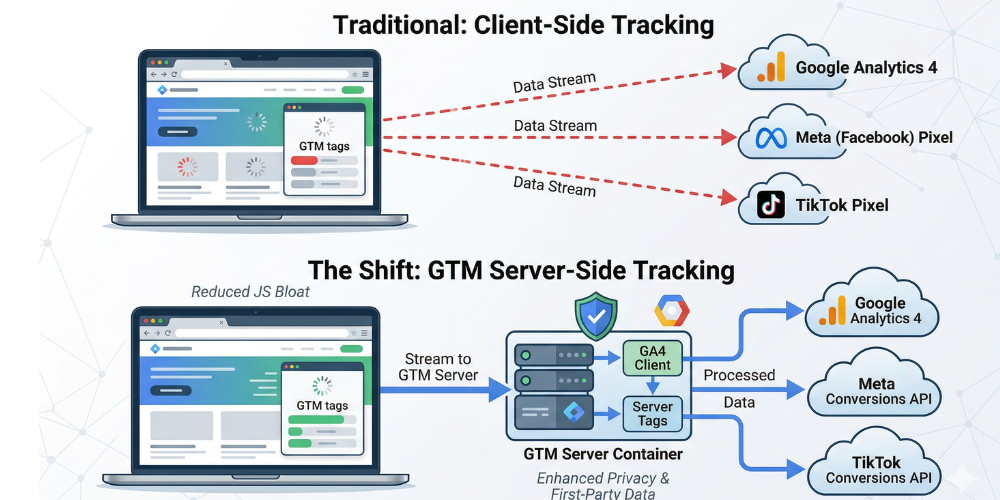
Traditionally, GTM operates on the client-side (the user's browser). When a user clicks a button, the browser executes multiple JavaScript tags, sending data directly to vendors like Google Analytics, Facebook, or TikTok.
Server-Side Tracking introduces a middleman—a private server you control. Instead of the browser talking to ten different vendors, it sends one stream of data to your server. Your server then processes that data and distributes it to the vendors.
Why Should You Care? (The Benefits)
Switching to server-side isn't just a technical flex; it solves real business problems:
- Improved Website Performance: By moving heavy tracking scripts from the browser to the server, you reduce "JavaScript bloat." This leads to faster load times and better Core Web Vitals.
- Bypassing Ad Blockers: Since data is sent to your own subdomain (e.g., metrics.yourwebsite.com), it looks like first-party data. This makes it much harder for ad blockers to intercept.
- Enhanced Data Privacy: You act as a gatekeeper. You can strip away PII (Personally Identifiable Information) or anonymize IP addresses before the data ever reaches a third-party vendor.
- Extended Cookie Lifespans: In the age of Apple’s ITP (Intelligent Tracking Prevention), client-side cookies often expire in 24 hours. Server-side cookies, set in a first-party context, can last much longer, giving you a clearer picture of the customer journey.
How GTM Server-Side Works: The Workflow
Setting this up requires a bit more "under the hood" work than a standard GTM container. Here is the logical flow:
- The Trigger: A user interacts with your site (e.g., a Page View).
- The Web Container: Your standard GTM Web Container collects this event and sends it to your Server Container via a single request.
- The Server Container: Hosted on Google Cloud (or another cloud provider), this container receives the request.
- The Clients: In the server container, a "Client" parses the incoming data.
- The Tags: Server-side tags format that data and fire it off to Google Analytics 4, Meta Conversions API, etc.
Key Components You’ll Need
To get started, you'll need to familiarize yourself with these three pillars:
- Google Cloud Platform (GCP): While you can use other servers, GTM is built to integrate seamlessly with App Engine.
- The Server Container: A new type of container created within your GTM account.
- Custom Subdomain: To get the full benefits of first-party tracking, you must map a subdomain of your site to your tagging server.
Is It Right for You?
Server-side tracking isn't a "set it and forget it" solution. It comes with hosting costs (usually starting around $30-$100/month for a production environment) and requires a higher level of technical expertise to maintain.
You should consider the move if:
- You spend significantly on paid ads (Meta, Google Ads) and need more accurate conversion data.
- Site speed is a critical KPI for your SEO or E-commerce conversion rate.
- You operate in a strictly regulated industry where data security is paramount.
Deep Dive: Mastering the Architecture of GTM Server-Side
If the previous overview piqued your interest, you’re likely wondering about the "how" and the "what else." Moving to a server-side environment is a strategic pivot. Let’s dig into the technical nuances, the specific use cases for the Conversions API (CAPI), and the security layers that make this setup a gold standard for 2026.
The "Client" vs. "Tag" Distinction
In a standard web container, you have Tags and Triggers. In a Server container, there is a third, vital layer: The Client.
- The Client: This is the "listener." It’s a piece of software inside your server container that waits for incoming requests (usually from your web container or a mobile app). It claims the request, transforms it into a readable event object, and makes it available for your tags.
- The Virtual Data Layer: Once a Client parses the data, it creates a server-side data layer. This allows you to augment the data. For example, you can take a simple
product_idsent from the browser and use a server-side lookup to add the margin or stock_level before sending it to your analytics—information you’d never want visible in a user's browser console.
Meta Conversions API (CAPI): The Killer App
The most common reason businesses migrate to GTM Server-Side is the Meta Conversions API. With the decline of the Meta Pixel's effectiveness due to browser restrictions, CAPI allows you to send web events directly from your server to Meta. When used in a "redundant" setup (sending both Pixel and CAPI events), Meta’s deduplication logic ensures you don't double-count conversions, while significantly increasing your Event Match Quality score. Higher match quality equals better ad targeting and lower Cost Per Acquisition (CPA).
Advanced Use Cases: Beyond Just "Tracking"
1. Secret Key Masking
Many third-party API integrations require an API Key. If you trigger these from the browser, a savvy user can find that key in your source code. With server-side tracking, the API key stays hidden in your server environment. The browser never sees it; it only sees a request going to your own domain.
2. Cost-Profit Analysis in Real Time
Imagine sending a "Purchase" event to Google Analytics. On the server side, you can intercept that event, query your internal database for the COGS (Cost of Goods Sold), and send the actual profit as a custom metric instead of just the top-line revenue.
3. Bot Filtering
You can set up logic on your tagging server to identify and discard requests from known bot patterns or non-human traffic before that data ever hits your analytics platforms. This cleanses your data at the source, saving you from making business decisions based on inflated "ghost" traffic.
Challenges and "Gotchas"
While the benefits are massive, transparency is key. Here is what you need to prepare for:
- The "Black Box" Effect: Debugging is harder. You can't just open the browser console and see what's happening. You have to rely on the GTM Server Preview mode and Google Cloud logs.
- Maintenance: Since you are essentially running a small piece of infrastructure (Google Cloud Run or App Engine), you need to monitor for 4xx or 5xx errors.
- Cloud Scaling: If you have a massive traffic spike (like a Black Friday sale), your server instances need to be configured to "auto-scale" to handle the load, which can temporarily increase your hosting costs.
The Implementation Roadmap
If you're ready to build, follow this sequence:
- Provision: Set up a Google Cloud project and create your GTM Server Container.
- Point: Map your custom subdomain (e.g., sst.example.com) to the server.
- Transport: Update your Web Container's GA4 configuration tag to point to your new "Transport URL" (your subdomain).
- Listen: Verify that the "GA4 Client" in your Server Container is receiving the hits.
- Route: Build your server-side tags (GA4, Meta CAPI, Google Ads Remarketing) to distribute that data.
Summary Table: Client-Side vs. Server-Side
| Feature | Client-Side (Traditional) | Server-Side (The Future) |
|---|---|---|
| Data Control | Low (Vendor receives everything) | High (You filter before sending) |
| Site Speed | Can be slow (Heavy JS) | Fast (Lightweight JS) |
| Privacy | Vulnerable to leaks | Secure (PII Masking) |
| Ad Blockers | Easily blocked | Highly resilient |
| Cost | Free | Hosting fees apply |
The era of "wild west" browser tracking is ending. Server-side tracking is no longer just for enterprise-level companies; it’s becoming the standard for anyone serious about data integrity and user experience.
By taking control of your data stream, you aren't just following the rules—you're gaining a competitive advantage.
Start by auditing your current tags and identifying which ones are slowing down your site the most. That’s your roadmap for migration.
Validated by MarTechRise Labs