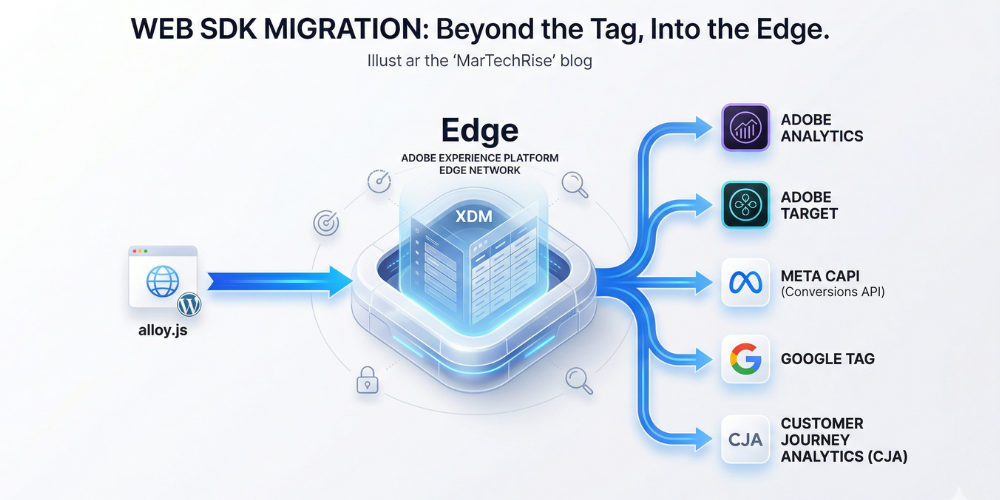
The move to Web SDK is the most significant migration since the transition from on-page code to Tag Management Systems. Here is a strategic roadmap.
In the world of digital analytics, we are currently witnessing a "once-in-a-decade" architectural shift. If you are still relying on legacy libraries like AppMeasurement.js for Adobe Analytics or analytics.js for Google Analytics, you aren’t just behind on a version update—you are running on an infrastructure that wasn't built for the privacy-first, server-side era.
The move to Web SDK (specifically the Adobe Experience Platform Web SDK or the unified Google Tag) is the most significant migration since the transition from on-page code to Tag Management Systems (TMS).
But here’s the contrarian truth: Migration is not a technical task. It is a strategic realignment.
Why Web SDK? (It’s Not Just About Speed)
Most guides will tell you that the Web SDK makes your site faster by consolidating multiple libraries into one (alloy.js for Adobe). While an 80% smaller footprint and 70% faster execution are great for SEO and CRO, the real value lies under the hood:
- The Edge Network: Instead of sending separate pings to Analytics, Target, and Audience Manager, you send one single stream to the Edge. The Edge then distributes that data.
- XDM (Experience Data Model): This is the "Grand Central Station" of data. It forces a standardized schema, ensuring your website, CRM, and offline data finally speak the same language.
- First-Party Foundation: In a world without third-party cookies, the Web SDK uses first-party device IDs (FPID), making your tracking resilient to browser restrictions like ITP.
The MarTechRise 5-Step Migration Framework
At MarTechRise, we advocate for a Decision-First migration. We don’t just move tags; we audit whether those tags are actually driving business value.
- 1. The Audit: Cleaning the Technical DebtBefore writing a single line of code, audit your current implementation. Most enterprises carry 30-40% "ghost code"—tracking for features that no longer exist.
- Action: Identify every s.prop, s.eVar, and custom event. If it hasn't been used in a report in 6 months, don't migrate it.
- 2. Schema Mapping (The XDM Hurdle)This is where most migrations stall. You must map your flat data layer to the hierarchical XDM Schema.
- Tip: Don’t try to map everything at once. Start with the AEP Web SDK ExperienceEvent class and build out field groups for your specific industry (e.g., Commerce, Advertising, or Lead Gen).
- 3. The "Dual-Tagging" PhaseNever "flip the switch" overnight. We recommend a Parallel Tracking period.
- Run your legacy tags and Web SDK simultaneously on a subset of pages.
- Compare the data in a validation report suite. Expect minor discrepancies (Web SDK is often more accurate due to better handling of race conditions), but look for outliers.
- 4. Configuration & DatastreamsInstead of configuring tools in the code, you configure Datastreams in the UI. This allows you to "forward" data to Adobe Analytics, Target, or even non-Adobe endpoints via Event Forwarding without touching the website code again.
- 5. Validation with "Assurance"Forget the old browser console network tab. Use Adobe Experience Platform Assurance (formerly Project Griffon). It allows you to see exactly how the Edge Network is processing your hits in real-time.
Common Pitfalls to Avoid
- The "Lift and Shift" Mentality: If you simply copy-paste your legacy logic into the Web SDK, you inherit all your old problems. Use this as a chance to modernize your data layer.
- Ignoring Team Silos: Since the Web SDK combines Analytics, Target, and Personalization into one call, your Analytics and Optimization teams must collaborate. A change in one affects the other.
- The Bounce Rate Trap: Be careful with how you trigger your Target calls. If not configured correctly, a Target hit might be interpreted as a second page view, artificially deflating your bounce rate.
Web SDK migration is the bridge to Customer Journey Analytics (CJA) and Real-Time CDP.It is the prerequisite for moving from "reporting on the past" to "predicting the future."
Expanded Pillars of Web SDK Migration
Here are three distinct content pillars essential for a successful transition.
Why Your Data Layer is Failing the XDM Test
Most migration projects stall at the Schema stage. In the legacy world, we lived in a "flat" environment—eVar1, prop5, event10. In the Web SDK world, we live in XDM (Experience Data Model).
The MarTechRise Insight:
XDM isn't just a technical requirement; it’s a common language. If your website calls a product "SKU" but your offline CRM calls it "Product_ID," your identity resolution will fail.
Key XDM Mapping Tips:
- Identity Map: This is the heart of the Web SDK. Ensure you are passing ECID (Experience Cloud ID) and your internal hashed_email or CRM_ID within the same identity map to enable cross-device stitching.
- Context Data: Stop hard-coding variables. Use the Web SDK to automatically collect browser, OS, and screen dimensions via the
_experiencefield group. - The "Breadcrumb" Strategy: Map your legacy props to custom XDM field groups so you don't lose your 13-year historical trend lines.
The Hidden Cost of "Waiting" to Migrate
As a founder, I often hear: "Our current tracking works, why change it?" Here is the breakdown of what staying on legacy libraries is actually costing your business:
| Cost Factor | Legacy Analytics | Web SDK (Modern) |
|---|---|---|
| Site Performance | Multiple pings (Adobe, Meta, Google) | One single ping to the Edge. |
| Privacy Compliance | Manual "kill switches" for tags. | Native Consent API integration. |
| Data Latency | 24–48 hours for full processing. | Seconds for Edge-processed data. |
| Future Proofing | Not compatible with CJA/AEP. | Native foundation for AI-driven insights. |
Staying on AppMeasurement.js is like trying to run a Tesla dealership with a fax machine. It works, but it's limiting your speed to market.
Moving the Burden: From Client-Side to the Edge
This is the most "human-led" strategy you can implement. Event Forwarding (part of the Web SDK ecosystem) allows you to move your marketing tags (Meta Pixel, LinkedIn Insight Tag, TikTok) off the user's browser and into the Adobe Edge Network.
Why this matters for your CRO:
- Cleaner Code: You remove heavy third-party JavaScript that slows down your "Time to Interactive."
- Data Governance: You decide exactly what data reaches Meta or Google. No more "leaking" PII (Personally Identifiable Information) by accident.
- Signal Resilience: By using the Web SDK to power Meta CAPI (Conversions API), you bypass ad-blockers and browser restrictions, often seeing a 15–20% increase in attributed conversions.
A "Migration Readiness" Checklist
- Documentation: Do you have a current SDR (Solution Design Reference)?
- Identity: Have you defined your primary identity namespace?
- Governance: Is your Data Privacy Officer involved in the consent mapping?
- Resources: Do you have a developer who understands JSON/Object-based data layers (rather than just flat strings)?
- Environments: Have you set up your "Development," "Staging," and "Production" Datastreams in the Data Collection UI?
Is your organization ready to move beyond the legacy tag?
Need a partner to navigate the XDM maze? At MarTechRise, we specialize in human-led, senior-level digital analytics strategy. Let’s ensure your migration is a foundation for growth, not just a technical checkbox.
Validated by MarTechRise Labs